
How to Set Up Daily On-Call Reminders in a Slack Channel
Overview of On-Call Reminders
Every schedule can have any number of reminders. Each reminder posts a message to a channel or sends a direct message, either when a shift begins or on a Custom recurrence you define. Two things to know before you start:
- Tellspin must be invited to the channel. Tellspin can't join channels on its own. In the channel, type
@Tellspinand click Invite, or add it from the channel's Integrations tab. Tellspin will reply that no rotation schedule is set for this channel; you can ignore that. - Reminders fire at shift changes, not when you create them. A weekly schedule that starts on Monday posts its "when a shift begins" reminder on Monday at the rotation hour. If you want something every day, use a Custom frequency (Option 2).
Option 1: Announce Each Handoff in a Channel
Open the Tellspin App Home in Slack, open the schedule's three-dot menu and click Edit.
Click Add Reminder (or Edit Reminders if the schedule already has one, then Add reminder).
Under What should the reminder say?, write the message.
{{shift_user}}and{{handle}}are replaced when the reminder fires, and{{next_shift_user}}mentions whoever is up next, for example{{shift_user}} is on-call for {{handle}}. {{next_shift_user}} is up next. The Reminder Preview shows the result.Under What shift user should be used?, keep Currently on-call.
Under Where should the reminder be sent?, choose Channel and pick the channel under Select a channel (Invite @Tellspin to this channel).
Leave Frequency as When a shift begins (on a PagerDuty-synced schedule this reads When a pagerduty shift begins).
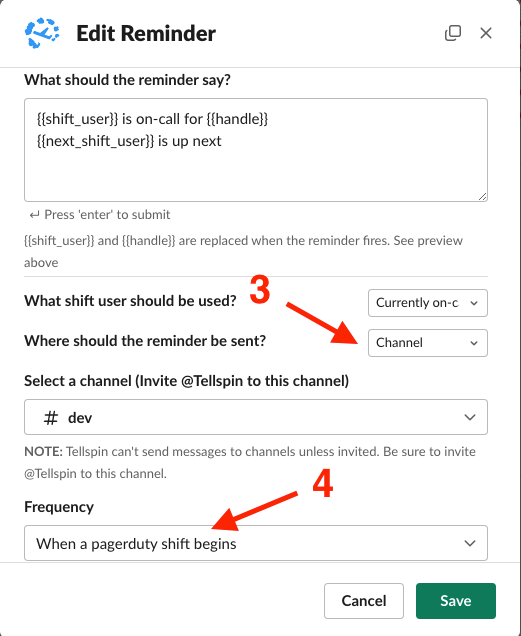
Edit Reminder modal with message template, Currently on-call, Channel, and frequency When a pagerduty shift begins Click Add.

When each shift starts, Tellspin posts in the channel:

Option 2: Post at a Fixed Time Every Day
Use this for a daily announcement on a weekly or two-week rotation, or for a heads-up to the next person.
Add a reminder as above, but set Frequency to Custom.
Set the Start Date and Time. The time zone shown under the picker is the schedule's timezone, not yours (see how timezones work).
Under Every, choose the interval, for example
1week, and under on pick the days, for example Mon–Fri. The Preview line reads back the recurrence, such as Weekly on Weekdays.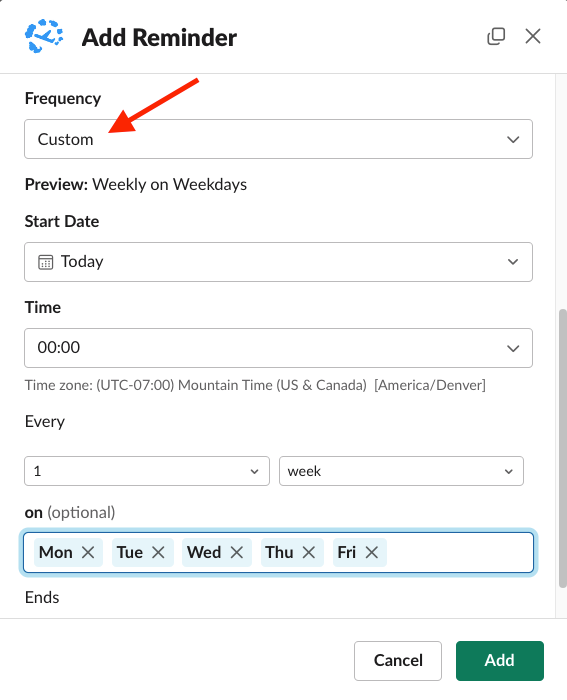
Add Reminder with Frequency Custom, Time 00:00, every 1 week on Mon Tue Wed Thu Fri To remind the next person instead of the current one, set What shift user should be used? to Next up on-call and choose Direct Message as the destination.
Click Add.

Verifying the Reminder
The Reminders modal lists each reminder in plain language, for example Send to #general when a shift begins or Send direct message every Monday at 11:00, with the shift and message text beneath it.

Click Test Send on a reminder to post it right now and confirm the channel and wording. Reminders are skipped while a schedule is deactivated (for example on weekends when Deactivate on weekends is on).