
How to Rotate Between Entire User Groups
When to Rotate Between Groups
Instead of rotating individual people, you may want to rotate responsibility between whole teams:
- Week 1: everyone in
@devs1is on-call. - Week 2: everyone in
@devs2is on-call.
Tellspin supports this with the Multiple user groups user selection method. Each shift in the rotation is a Slack user group rather than a person.
Prerequisites: Create the Slack User Groups
The user groups you rotate between must already exist in Slack with the right members (for example @devs1 and @devs2). Tellspin reads their membership; it doesn't manage those groups.
Creating the Schedule
From the Tellspin App Home, click New Schedule (or Edit an existing schedule and open Edit Users).
Set the Rotation frequency, for example Weekly.
In the Select Users modal, set User selection method to Multiple user groups.
Under How many user group shifts do you want?, choose the number of teams in the rotation.
Pick one user group for each shift (Shift 1, Shift 2, and so on).
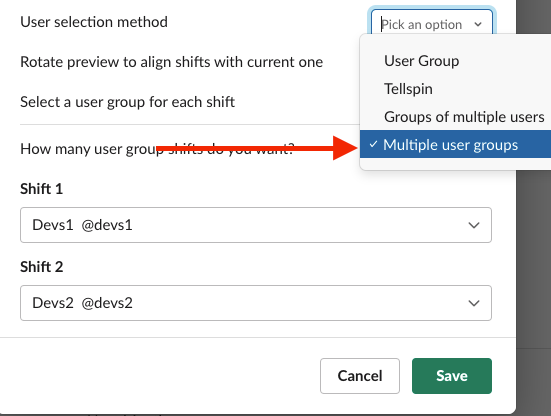
User selection method set to Multiple user groups with @devs1 and @devs2 as shifts Choose a contact method for the schedule, such as a new user group handle like
dev-on-call, and save.

How Handoffs Work
At each handoff Tellspin replaces the members of the managed handle (@dev-on-call) with the members of the next group in the rotation:
- Week 1:
@dev-on-callcontains everyone in@devs1. - Week 2:
@dev-on-callcontains everyone in@devs2.
The App Home preview lists the group on-call for each shift:

Limitations and Considerations
- No rotation within a group. When
@devs1is on-call, all of its members are on-call for the whole shift. Tellspin does not rotate through the individuals inside the group. If you want that, create a normal schedule per team and use the team's group as the participant source instead. - Different from the "User Group" source. The User Group selection method uses one group as the list of people to rotate through individually. Multiple user groups rotates between several groups.
- Different from Schedule Triage. Schedule Triage combines the on-call people from several schedules at the same time; it doesn't rotate between them.