
How to Configure a Weekends-Only On-Call Rotation
Use Case: Weekend and After-Hours Support
Some teams hand weekend coverage to a separate group of people. Tellspin has a dedicated Weekends Only rotation frequency: the schedule is active Saturday and Sunday, rotates to the next person each weekend, and is deactivated during the week.
Steps to Create a Weekend Schedule
From the Tellspin App Home, click New Schedule (or Edit an existing schedule).
Under When do you want to rotate?, open the Rotation frequency dropdown and choose Weekends Only.
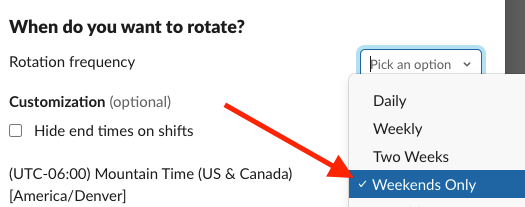
Rotation frequency dropdown with Weekends Only selected Confirm the timezone shown beneath the rotation settings is the one your weekend team works in (see how timezones work).
Add your participants and save.

Verifying the Schedule Preview
The preview under the schedule in the App Home shows a Disabled on weekdays notice and one Sat – Sun shift per weekend, rotating through your participants:

During the week nobody is on-call, so the schedule's user group is disabled until Saturday.
Using with a Weekdays-Only Schedule for 24/7 Coverage
Pair this schedule with a weekdays-only schedule for your primary team, then merge both into a single handle with Schedule Triage. The combined handle always contains the right person, whether it's a weekday or the weekend.
Related
- Creating Advanced Schedules for hourly and other custom rotations